Choosing between singlemode and multimode fiber optic cables is a fundamental decision in network infrastructure planning. This guide explains the key differences and helps you select the right fiber type for your application.
Core Differences
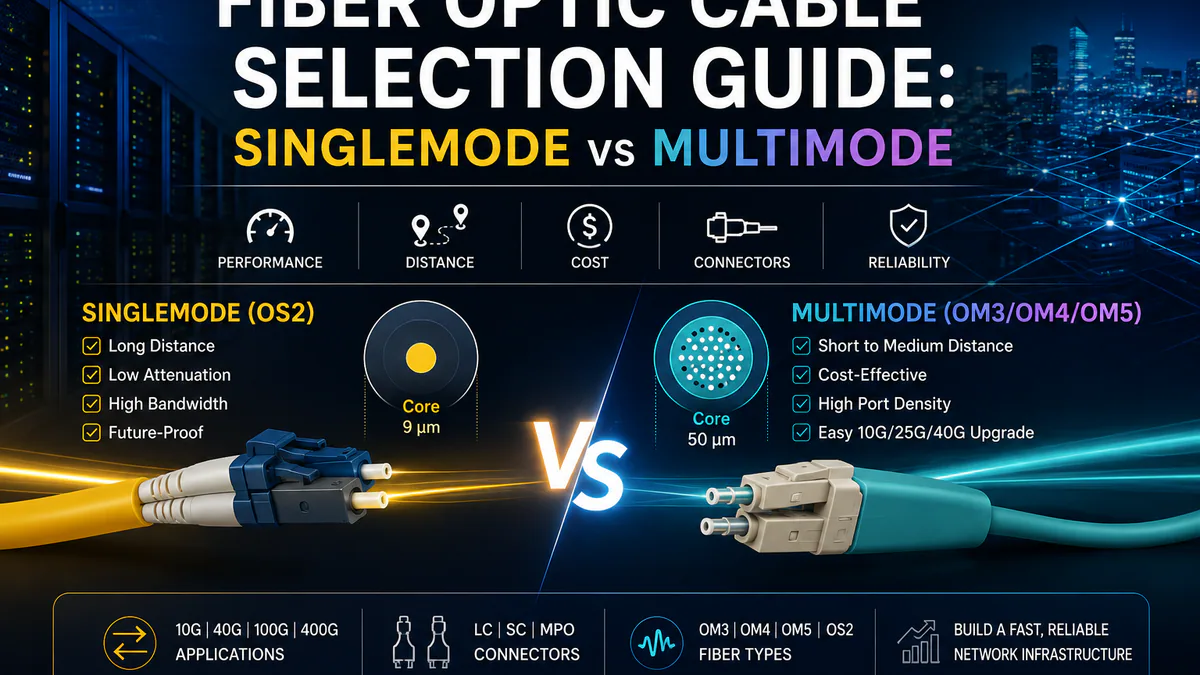
Singlemode Fiber (OS2)
Characteristics:
- Core diameter: 8-10 μm
- Supports only one propagation mode
- Long-distance transmission (up to 100km+ without amplifiers)
- Lower attenuation and dispersion
Best for:
- Long-haul applications
- Telco and carrier networks
- Campus backbone connections
- 10G/40G/100G/400G over distances > 500m
Multimode Fiber (OM3/OM4/OM5)
Characteristics:
- Core diameter: 50 μm or 62.5 μm
- Multiple propagation modes
- Short to medium distances (up to 400m for 10G)
- Higher modal bandwidth enables higher speeds over shorter distances
Best for:
- Data center horizontal cabling
- Enterprise LAN backbone
- 10G/25G/40G server connections
- Cost-effective short-distance applications
Comparison Table
| Specification | Singlemode (OS2) | Multimode (OM3) | Multimode (OM4) |
|---|---|---|---|
| Core Diameter | 9 μm | 50 μm | 50 μm |
| Max Distance (10G) | 10km+ | 300m | 400m |
| Max Distance (40G) | 10km+ | 100m | 150m |
| Max Distance (100G) | 10km+ | 70m | 100m |
| Cost per Meter | Higher | Lower | Moderate |
| Transceiver Cost | Higher (DFB laser) | Lower (VCSEL) | Lower (VCSEL) |
Fiber Connectors
Common connector types:
- LC: Small form factor, duplex, most common in data centers
- SC: Push-pull design, simplex applications
- FC: Screw-type coupling, telco applications
- ST: Bayonet coupling, legacy networks
Selection Criteria
Consider Singlemode When:
- Distance exceeds 500m - Singlemode eliminates modal dispersion
- Future-proofing - Single infrastructure for 10G to 400G+
- Long-haul requirements - Spans between buildings or campuses
- Budget allows - Lower total cost of ownership over long distances
Consider Multimode When:
- Distance under 400m - Significant cost savings
- High port density - More connections per rack
- Budget constraints - Lower transceiver and cable costs
- Migration path - Easy 10G upgrade path
Color Codes
- Yellow: Singlemode (OS2)
- Aqua: OM3 laser-optimized multimode
- Erika Violet: OM4 laser-optimized multimode
- Lime Green: OM5 (SWDM)
Polarity, Breakout, and Density
Modern data centers often use MPO/MTP cabling for high-density uplinks and breakout designs. In these environments, selecting the fiber type is only one part of the decision. Teams also need to validate polarity method, connector gender, pinning, and whether the link will be used as a direct parallel optic or as a breakout to multiple lower-speed ports.
Common patterns include:
- LC duplex links for 1G, 10G, 25G, and many 100G single-lambda or duplex applications.
- MPO-12 links for 40G/100G SR4 and breakout connections.
- MPO-16 or MPO-24 links for higher-density 400G/800G designs, depending on optics type.
- Cassette-based cabling when teams need cleaner patching and easier moves, adds, and changes.
Polarity mistakes can be difficult to diagnose because optical power may appear normal while the transmit and receive lanes are crossed. For high-density deployments, label every trunk, cassette, and patch cord before installation and maintain a port map that matches the switch configuration.
Installation and Maintenance Risks
Fiber links are sensitive to handling quality. Bend radius, connector cleanliness, and patch-panel strain relief can have as much impact on reliability as the fiber grade itself.
Best practices:
- Inspect and clean connectors before first use and before every reconnection.
- Keep bend radius within the cable manufacturer’s recommendation.
- Separate temporary patching from permanent structured cabling.
- Record loss test results for backbone links and critical uplinks.
- Avoid mixing OM3, OM4, OM5, and OS2 in the same documented link path.
Planning Your Infrastructure
For new data center deployments, evaluate:
- Current bandwidth needs - 10G or 25G access?
- Growth trajectory - When will you need 40G/100G?
- Distance requirements - Measure worst-case link length
- Budget constraints - Hardware vs lifecycle cost trade-offs
Recommended Buying Workflow
Start with a port-level link matrix. For each connection, document the source port, destination port, distance, target speed, connector type, and optic type. From there, classify links into standard patch cords, trunks, breakout cables, or custom lengths. This prevents overbuying expensive optics for short links and avoids under-specifying backbone links that need singlemode reach.
For most enterprise buyers, the practical rule is simple: use OM4 multimode for short, high-density rack and row links, and use OS2 singlemode for longer campus, inter-building, and future high-speed backbone links. Validate every exception before purchasing at scale.